
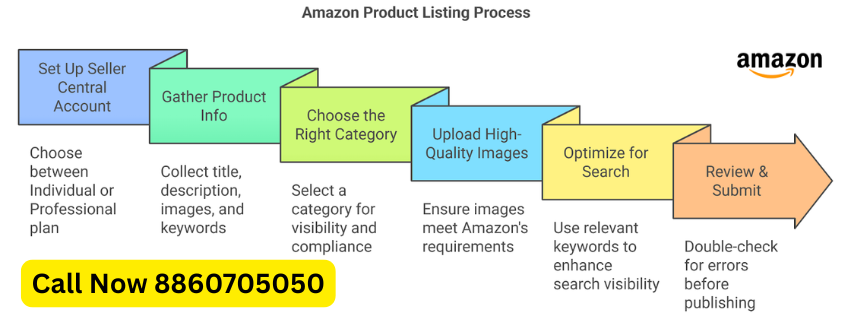
 सबसे पहले Amazon Seller Central पर जाएँ और Seller Account बनाएं।
ज़रूरी Documents:
- GST Number
- PAN Card
- Bank Account
- Mobile Number
- Email ID
Step 2: Seller Dashboard Login करें
Account बनने के बाद Seller Central Dashboard में Login करें।
Step 3: “Add Product” Option पर जाएँ
Dashboard में:
- Catalog पर क्लिक करें
- फिर Add Products चुनें
Step 4: Existing Product या New Product चुनें
अगर Product पहले से Amazon पर मौजूद है:
- Product Name या Barcode Search करें
- “Sell This Product” पर क्लिक करें
अगर नया Product है:
- “I’m adding a product not sold on Amazon” चुनें
Step 5: सही Category चुनें
अपने Product की सही Category Select करें जैसे:
- Fashion
- Electronics
- Beauty
- Home & Kitchen
सही Category SEO और Ranking के लिए बहुत जरूरी होती है।
Step 6: Product Title लिखें
एक SEO Friendly Title बनाएं।
Example:
Men’s Cotton Casual T-Shirt | Round Neck | Black | Large
Title में:
- Brand Name
- Product Type
- Color
- Size
- Main Keywords शामिल करें
Step 7: Product Images Upload करें
High Quality Images डालें:
- White Background
- Clear Product View
- Different Angles
- Minimum 1000x1000 pixels
अच्छी Images Sales बढ़ाने में मदद करती हैं।
Step 8: Product Description और Bullet Points लिखें
Bullet Points में लिखें:
- Features
- Material
- Benefits
- Usage
Description में:
Product की पूरी जानकारी आसान भाषा में दें।
Step 9: Keywords डालें
Backend Search Terms में Relevant Keywords डालें ताकि Product Search Results में दिखे।
Example:
- cotton tshirt for men
- black t shirt
- casual wear tshirt
Step 10: Price और Stock डालें
- Product Price सेट करें
- Available Quantity डालें
Step 11: Shipping Method चुनें
दो Options होते हैं:
- Easy Ship – Amazon Delivery करेगा
- Self Ship – आप खुद Delivery करेंगे
Step 12: Save & Publish करें
सब जानकारी भरने के बाद:
- “Save and Finish” पर क्लिक करें
कुछ समय बाद आपका Product Amazon पर Live हो जाएगा।
Amazon Listing Tips
- अच्छे Keywords इस्तेमाल करें
- HD Images लगाएं
- Competitive Price रखें
- Reviews बढ़ाने पर ध्यान दें
- SEO Friendly Title बनाएं
अगर चाहें तो मैं आपको:
- Amazon Product Listing Template
- SEO Friendly Title Examples
- Product Description Format
- Amazon Listing Interview Questions
- भी बना सकता हूँ।
Call Now 8860705050 For Learning